



Profile and account settings
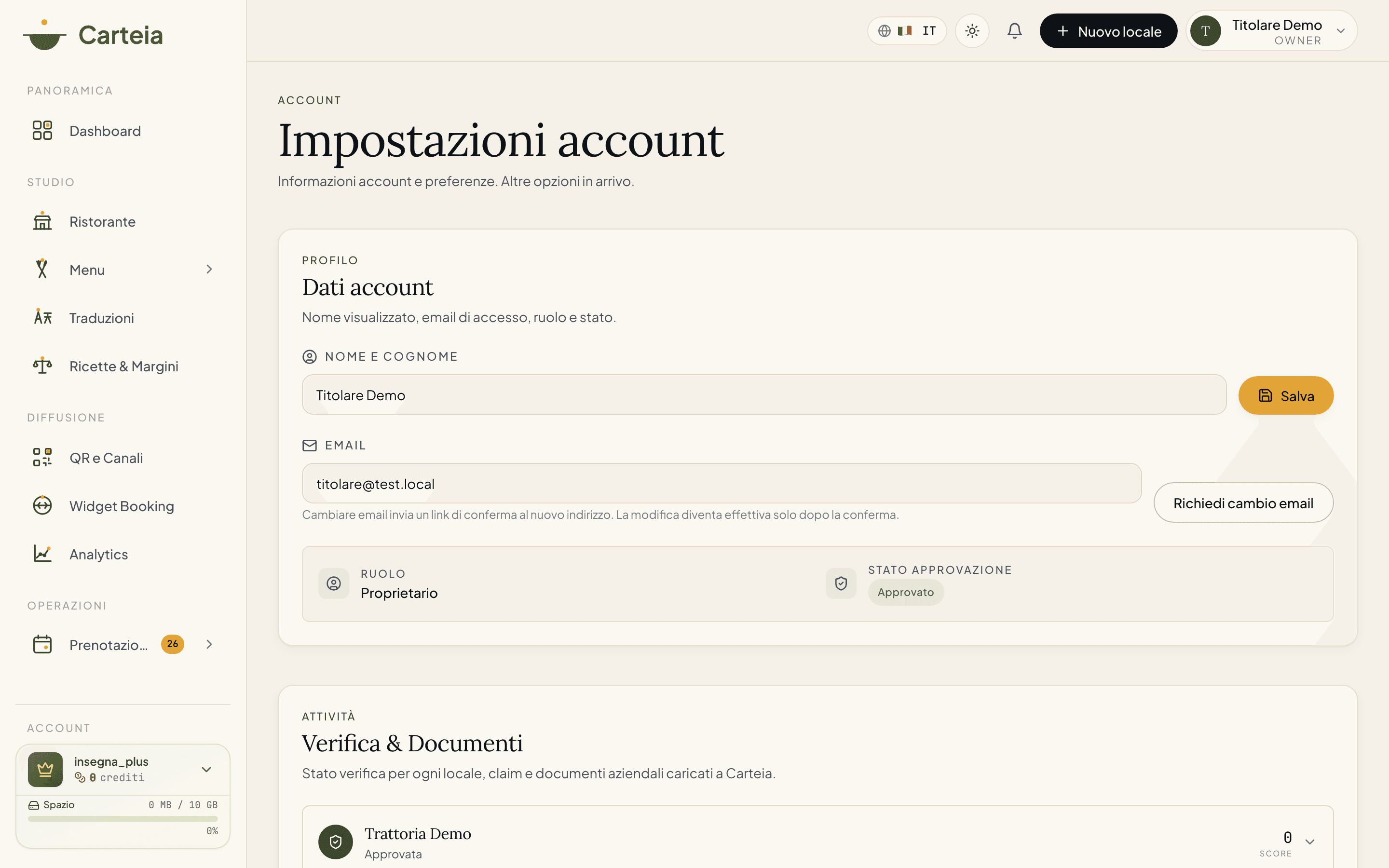
From the Settings page you change your name, request an email change (with a confirmation link), see your role and verification status, and pick the interface language. All on your own, no need to email support.
Why it pays to keep it up to date
Your account is the key to everything: you sign in with it, you receive invoices on it, you manage your venues with it. Keeping your name and email current means the important messages actually reach you, and the people who work with you recognize you. The good news: now you do almost everything yourself, in seconds, from the Settings page. No more emailing support to change a couple of lines.
What you change yourself
- Name
- Type your name (or the name of whoever runs the account) in the
Namefield and pressSave. It's live right away. At least a couple of letters are required. - Sign-in email
- Want to sign in with a different address? Type it in the email field and press
Request email change. We send a confirmation link to the new address: until you click it, the old one stays valid. It's a safeguard: nobody can steal your access by changing the email behind your back.
What you see (but don't change here)
- Role
- It tells you what you can do on the platform:
owner(the account holder, sees everything, including plan and invoices),collaborator(a team member with restricted access to the venue) orsuper_admin(Carteia staff). The role is assigned by whoever invited you; it isn't changed from here. - Verification status
Where you are in the venue verification process:
- approved — verification complete, you have full access.
- pending — we're checking the data.
- rejected — something doesn't add up. Open a request and we'll help you fix it.
The other sections of the page
Scrolling the same Settings page you'll find two more areas dedicated to your rights and your account's documents:
- Privacy & Consents — turn the platform's marketing emails on or off, download a copy of all your data, contact the data protection officer and, if you wish, request account deletion. The details are in the Data export guide.
- DPA and Terms of Service — the list of the data processing agreements (DPA) and Terms of Service signed for your venues, with the status (approved, pending, rejected) and the downloadable document.
Interface language
The language selector is at the top right of the dashboard. You can choose from eight languages: Italian, English, French, German, Spanish, Portuguese, Russian, Chinese. The chosen language also applies to the emails we send you (confirmations, alerts, receipts): if you'd rather get everything in English, keep it on English.
If you need help
For access recovery or unusual situations (you lost both the email and the linked number, or you need to transfer an account) write to support: we verify identity with billing data before stepping in.
Next steps
Frequently Asked Questions
- Can I change my name myself?
- Yes. Go to Settings, type the new name in the `Name` field and press `Save`. It's instant, no need to go through support.
- How do I change the email I sign in with?
- In Settings type the new email and press `Request email change`. A confirmation link arrives at the new address: the change only takes effect once you click it. That way nobody can hijack your access.
- What does the 'pending' status next to my account mean?
- It's the verification status of your venue. `Approved` = all good. `Pending` = we're checking. `Rejected` = something doesn't add up, open a request and we'll help you fix it.
- How do I change the panel language?
- From the language selector at the top right of the dashboard. Eight languages are available: Italian, English, French, German, Spanish, Portuguese, Russian, Chinese. The same language is also used for the emails we send you.
Version history
v3.0.02026-05-29— Full rewrite: the Settings page now exposes self-service name editing, an email-change request with confirmation, a Privacy & Consents section (marketing consent, data export, DPO contact, account deletion) and a DPA/Terms of Service section. Updated the six 2026-Q2 plans. Role and verification status remain read-only.v2.0.02026-05-22— Aligned to a page that only showed email/role/status (before the self-service sections shipped).v1.0.02026-05-20— First publication.