



AI FAQ for the dish page
Carteia generates 3 to 5 questions and answers for each dish, in the format AI assistants prefer to cite. Costs 2 credits per dish. From the Bistro plan up, with automatic translation into your menu's languages. The dish's public page publishes the FAQ block that Google and AI engines know how to read.
In short
The AI FAQs for the dish are the strongest lever for landing inside AI assistants' answers. When Google AI Overview, ChatGPT, Perplexity and Gemini choose what to cite, they prefer pages with clear questions and answers. Carteia generates 3 to 5 questions and answers for each dish, in the right format, and publishes them directly on the dish page.
When you need it
- You want your venue to show up in answers from ChatGPT, Perplexity and Google AI Overview when someone asks about your dishes.
- You have dishes with skimpy descriptions and want to enrich them without hours of copywriting.
- You want to make the menu clearer for people with specific needs (intolerances, diet, ingredients, pairings).
How it works
For each dish, the AI receives: the name, the description (if any), the ingredients, the menu section and the name and type of cuisine of the venue.
The rules are three, non-negotiable:
- Between 3 and 5 questions and answers.
- Real questions, the kind a customer would ask: ingredients, preparation, diet, pairings, portion.
- Short answers (at most two sentences), concrete, without inventing data you didn't provide.
Right after, the questions and answers are translated into your plan's languages, in the same operation and at no extra cost.
Step by step
All dishes at once
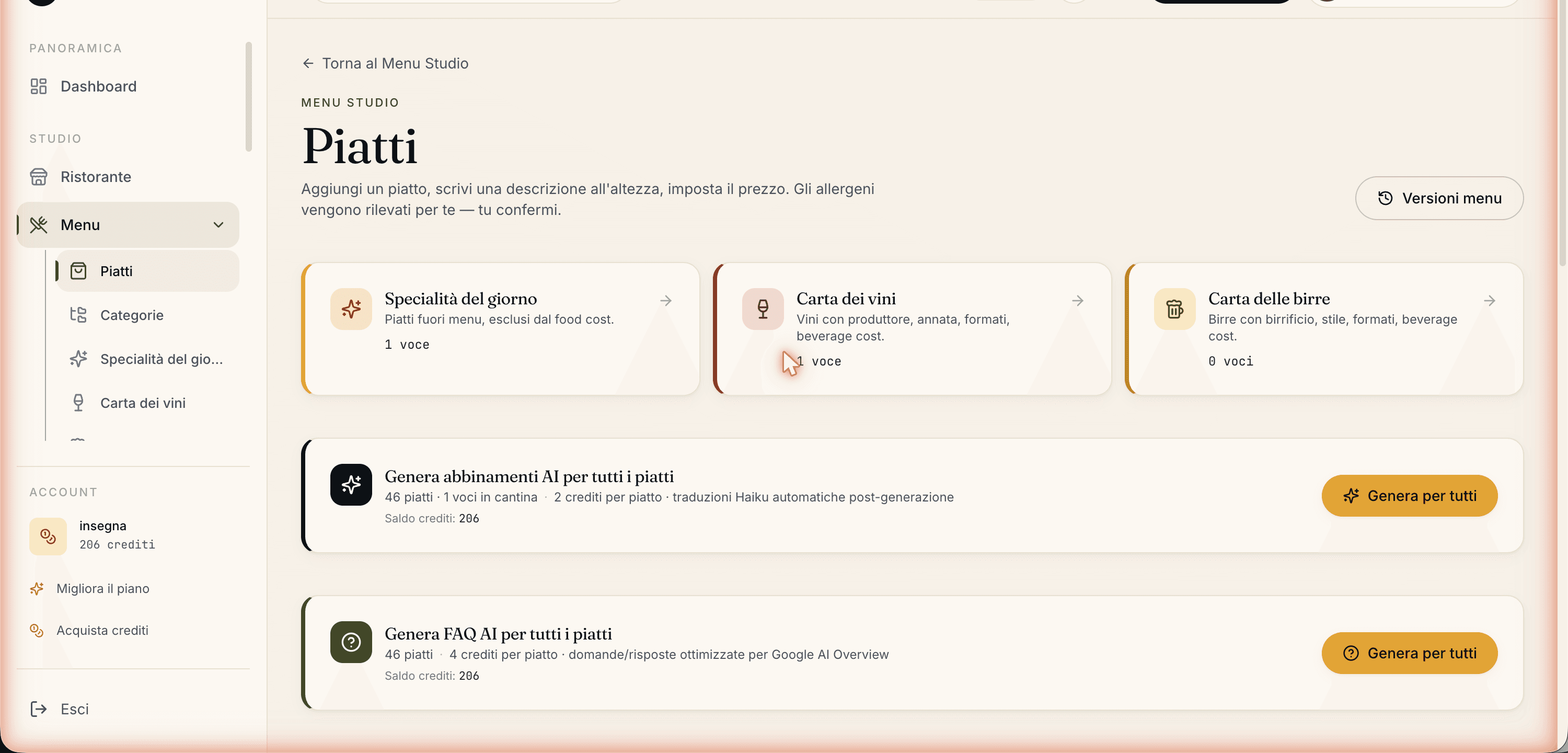
In Menu → Dishes you'll find the panel to generate the AI FAQs for all dishes.
Start it: a window opens and calculates on the fly the total dishes, those to process (excluding ones that already have FAQs), the cost per dish and the balance left.
- carteia.app
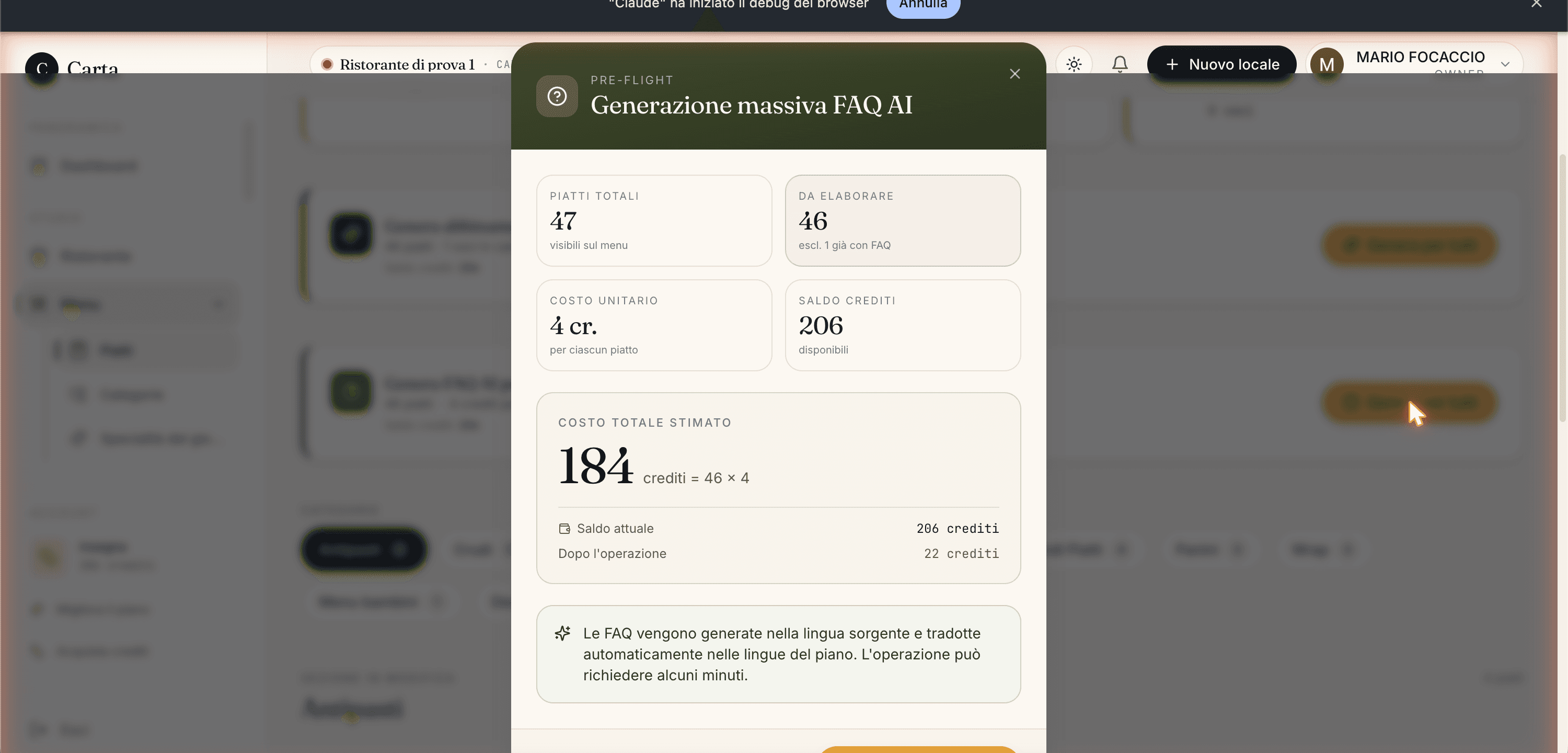
The summary window: real-time numbers and total cost. The confirm button stays off if the balance isn't enough or there's nothing to process. Check the numbers and confirm. Bulk generation can take a few minutes: don't close the window.
At the end the FAQs are saved on the dish and translated into the plan's languages. You see them both in the dashboard and on the dish's public page.
One dish at a time
From the dish card in Menu → Dishes, open the FAQ box and click Generate with AI. The result is identical to bulk mode, but one request at a time. From there you can also add, rewrite or delete questions by hand and save again: Carteia realigns the translations.
What the customer sees
When a dish has FAQs, on its public page:
- the Frequently asked questions section appears, with answers that open in an accordion;
- the technical block that Google and AI assistants know how to read gets published;
- the FAQs are shown in the visitor's language.
Why it matters for getting cited by AI assistants
AI assistants choose as sources the pages that:
- have a clear structure (Carteia provides it by default);
- answer the question directly;
- live on trustworthy, well-built sites.
The question/answer format is exactly what lets assistants pull a ready-made snippet to cite: a good FAQ on one of your dishes can land inside an AI answer with a link to your menu.
How much it costs
- Generating FAQs for a dish
- Без дополнительной платы per dish, both single and in bulk generation.
- Translation
- Included in the same operation: no extra credit for the plan's languages.
| Plan | AI FAQ | Cost per dish | Languages translated |
|---|---|---|---|
| Assaggio | — | — | — |
| Osteria | — | — | — |
| Bistro | Included | 2 credits | 4 |
| Ristorante | Included | 2 credits | 8 |
| Insegna | Included | 2 credits | 8 |
| Insegna Plus | Included | 2 credits | 8 |
Limits and things to know
- Available from Bistro up.
- Cost Без дополнительной платы per dish.
- Always between 3 and 5 questions and answers per dish.
- No inventions: if the description is too skimpy, the answers will be more generic but never false.
Errors you might run into
| Message | Why | What to do |
|---|---|---|
Available from the Bistro plan | Attempt on too low a plan | Move to Bistro or higher. |
Not enough credits | Balance below the required cost (or the bulk total) | Buy a pack from Credits or reduce the dishes. |
ANTHROPIC_API_KEY not configured | A server configuration problem | It's an internal error: write to support. |
Related features
- Menu management — descriptions and ingredients that feed the FAQs.
- AI Sommelier — AI pairings for wines and beers.
- Getting found on Google — the full SEO and AI picture.
- Plans and credits
Frequently Asked Questions
- Why generate FAQs if the dish already has a description?
- Because questions and answers are the format AI assistants (Google AI Overview, ChatGPT, Perplexity) prefer for pulling direct citations. A dish with FAQs has a much higher chance of being cited as a source than a plain description.
- Can the AI invent ingredients or preparations?
- No. The rules force it to answer only on the data you give it (name, description, ingredients, section, type of cuisine). If a piece of information isn't there, it doesn't make it up.
- Are the FAQs translated?
- Yes, into your plan's languages, in the same run and at no extra cost.
- Can I edit a FAQ by hand?
- Yes. Every question and answer is editable from the dish card: you rewrite, you delete the rows you don't need. The edits stay and keep the FAQ block on the public page.
Version history
v2.0.02026-05-29— Aligned with the code. Corrected the cost: 2 credits per dish (was 4; CREDIT_COSTS.ai_dish_faq = 2). Updated to the 6 real plans and added Insegna Plus. Confirmed 3-5 questions output and translation within the same run.v1.1.02026-05-22— Added real screenshots of the banner and the summary window.v1.0.02026-05-22— First publication.