



AI Sommelier: wine and beer pairings
For each dish, Carteia suggests 1 to 4 pairings chosen only from the wines and beers on your list: no made-up labels. Costs 1 credit per dish. From the Bistro plan up, with pairing notes translated automatically into your menu's languages.
In short
Carteia has a sommelier (and a beer expert) that, for each dish, suggests 1 to 4 pairings drawing only from the wines and beers you actually have on your list. No made-up labels, no producers that don't exist: an automatic check throws away any suggestion pointing to a bottle that isn't in your cellar.
The pairing notes are then translated into your menu's languages, so a customer opening it in English, French or Chinese finds the suggestion in their own language right away.
When you need it
- You have a wide wine list and want to put a quick suggestion under each dish, without writing every pairing by hand.
- You've just changed the seasonal menu and need to redo pairings for many dishes quickly.
- You want the suggestions available in every language of the menu, without managing the translations yourself.
How it works
The sommelier receives two things: the dish (name, description, ingredients, allergens, any pairing note you already wrote) and your cellar. To stay fast, the cellar is read up to a maximum of 80 wines and 40 beers.
The rule is iron-clad: use only items from your list, don't invent names, return 1 to 4 suggestions (free mix of wines and beers). After the answer, Carteia checks each pairing against your cellar list and discards anything that doesn't match. Only then, and only if at least one valid suggestion remains, is the credit charged.
Right after, the translation of the notes into your plan's languages starts on its own (4 for Bistro, 8 for Ristorante, Insegna and Insegna Plus). If you've used up the included translation quota, credits are used; if those run out too, the translation is simply skipped, without errors.
Step by step
One dish at a time
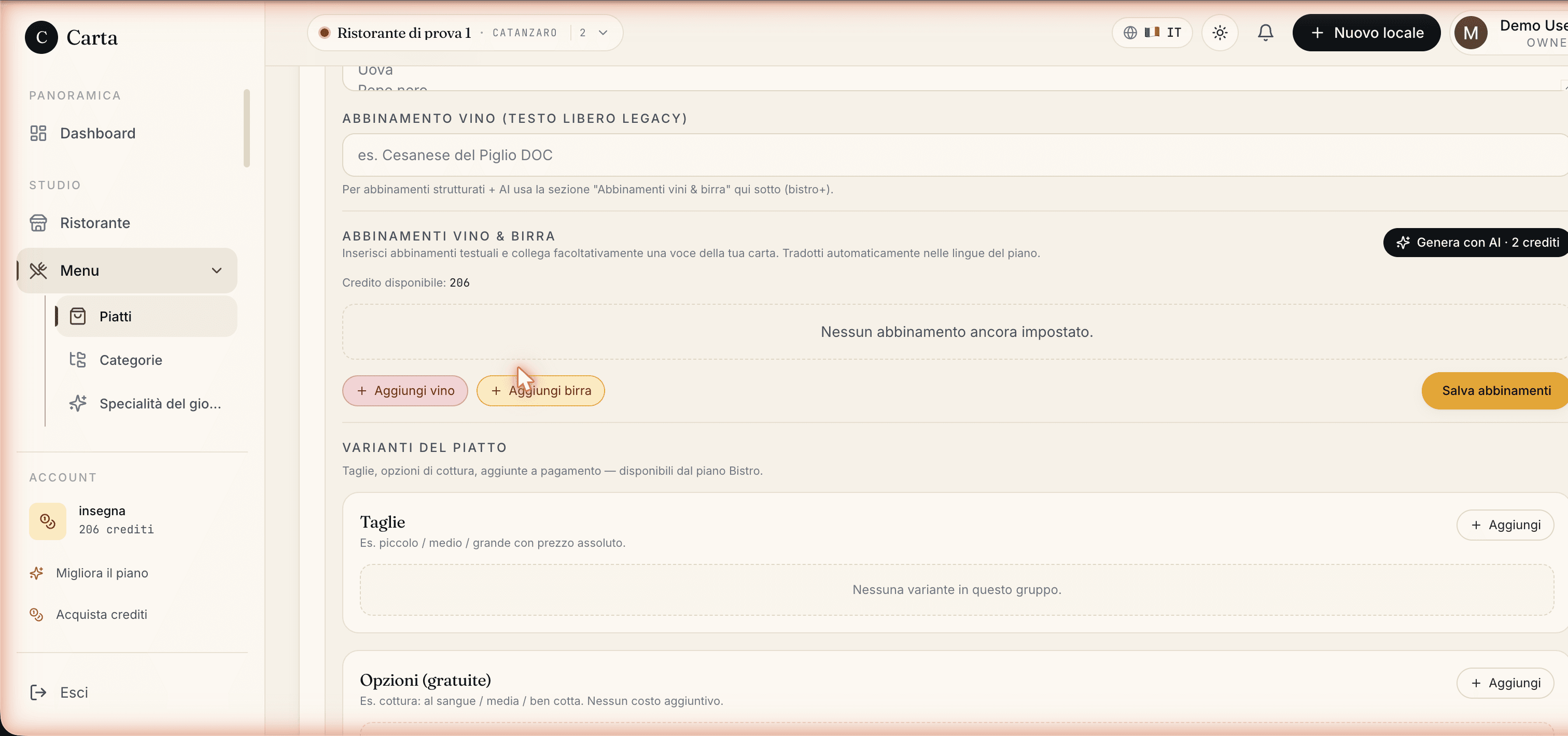
Open Menu → Dishes and select a dish.
Scroll to the
Wine & beer pairingsbox. On Assaggio and Osteria it's read-only with an invitation to move to Bistro; from Bistro up it's active.Click
Generate with AI. Carteia reads the cellar, queries the sommelier and, if the answer is valid, adds the suggestions after the pairings you already had.Review the results: every AI row carries the
AIbadge. You can change its note, the linked wine or beer, reorder or delete. Then save.
All dishes at once
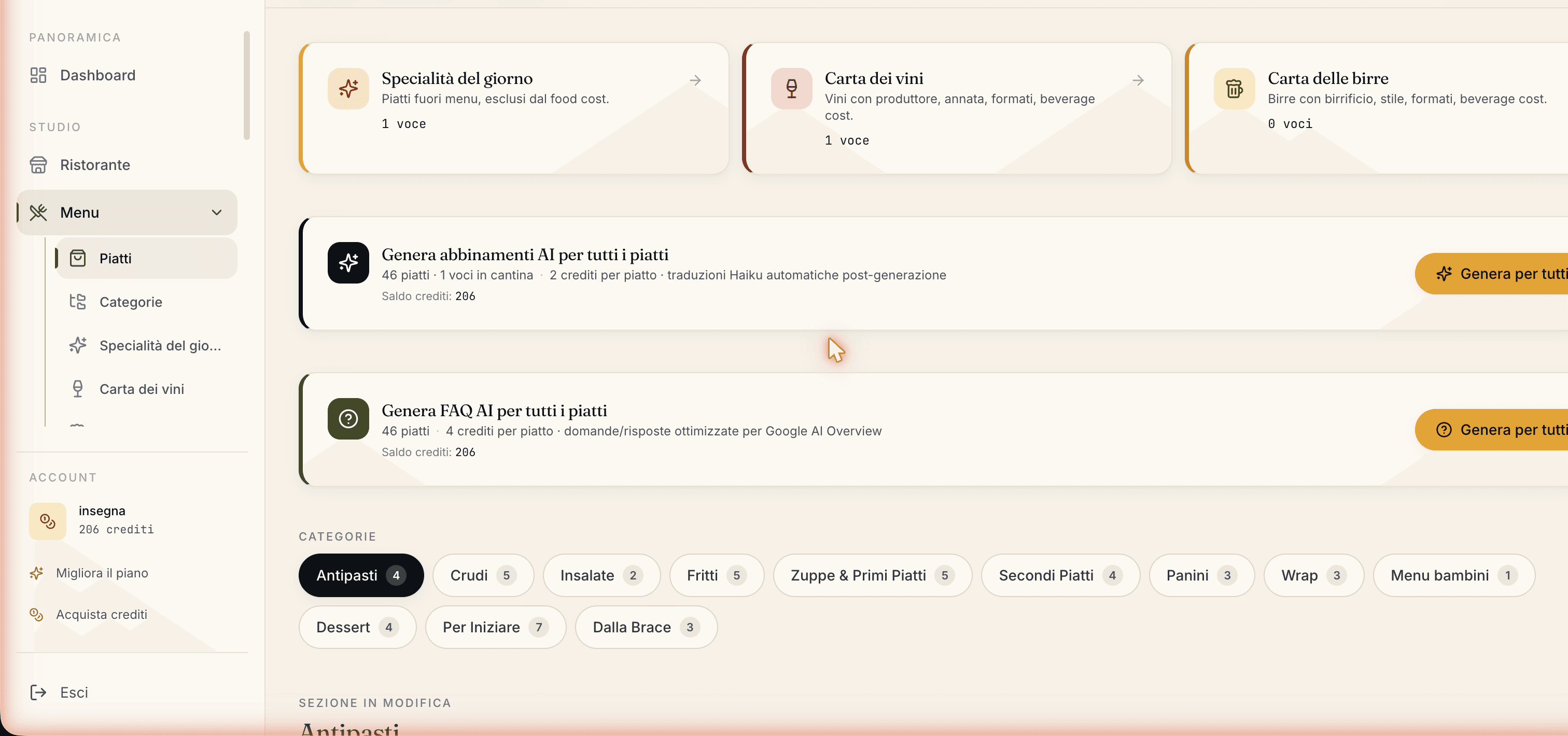
In Menu → Dishes you'll find the panel to generate pairings for all dishes.
Start it: a window opens and calculates on the fly the total dishes, those to process (excluding ones that already have AI pairings), the total cost and the balance left after.
Check the numbers. The confirm button stays off if you don't have enough credits, if the cellar is empty, or if there are no dishes to process.
Confirm. Bulk generation can take a few minutes: don't close the window. At the end the translation into the plan's languages starts on its own.
How much it costs
- Generating pairings for a dish
- Senza costo aggiuntivo per dish, both single and in bulk generation.
- Translating the notes
- Included, starts on its own at the end. No extra cost for the plan's languages.
| Plan | AI Sommelier | Cost per dish | Languages translated |
|---|---|---|---|
| Assaggio | — | — | — |
| Osteria | — | — | — |
| Bistro | Included | 1 credit | 4 |
| Ristorante | Included | 1 credit | 8 |
| Insegna | Included | 1 credit | 8 |
| Insegna Plus | Included | 1 credit | 8 |
Limits and things to know
- Available from Bistro up.
- Cost Senza costo aggiuntivo per dish.
- You need at least one item on your list among wines and beers: with an empty cellar the generation refuses and charges no credits.
- 1 to 4 suggestions per dish, free mix of wines and beers.
- No inventions: any suggestion pointing to an item not on your list is discarded. If they all fail, you pay nothing.
Errors you might run into
| Message | Why | What to do |
|---|---|---|
Empty cellar: add some wine or beer first… | You have no wine or beer items | Add at least one item to the wine or beer list, then retry. |
Not enough credits for AI generation. | Credit balance too low | Buy a pack from Credits, or reduce the dishes in bulk generation. |
The model suggested items not on the menu. | All suggestions failed the cellar check | Retry: it's rare. When it happens no credits are charged. |
Available from the Bistro plan. | Attempt on Assaggio or Osteria | Move to Bistro or higher from Plans. |
Related features
- Menu management — the wine and beer list the sommelier draws from.
- Menu translations
- Plans and credits
Frequently Asked Questions
- Can the AI suggest a wine I don't have on my list?
- No. It only receives your cellar list, and every suggestion must point to an item you actually have. If it tries to cite something that isn't there, that suggestion is discarded before saving and you're charged nothing.
- How much does it cost to generate pairings for every dish?
- 1 credit per dish. Before starting the bulk run you see the total cost, and dishes that already have AI pairings are skipped to avoid wasting credits.
- Are the pairing notes translated?
- Yes, automatically, into your plan's languages, with nothing for you to do. If you've used up the included translation quota, credits are used; if those run out too, the translation is skipped without errors.
- Can I edit a pairing the AI generated by hand?
- Yes. Every row is editable from the dish panel: you change the wine or beer, rewrite the note, reorder or delete. AI rows carry an AI badge but are otherwise normal rows.
Version history
v2.0.02026-05-29— Aligned with the code. Corrected the cost: 1 credit per dish (was 2; CREDIT_COSTS.ai_pairing_suggestions = 1). Updated to the 6 real plans and added Insegna Plus. Confirmed 1-4 pairings output and cellar read up to 80 wines + 40 beers.v1.0.02026-05-22— First publication.