



Loyalty and rewards
Loyalty program from the Insegna plan. Each customer has a personal QR: staff scan it to add points or hand over a reward. You create point rewards and promotional discounts with your own validity and limits; each reward becomes a coupon with QR and code that the customer shows at the till. No cards, no per-coupon cost.
Why it pays off
A returning customer spends more than a new one, and costs far less to win. Carteia's loyalty program is the simplest way to give people a reason to come back to you instead of the place across the street — with no plastic cards and no app to download.
Here's how it works: each customer has a personal QR in their account. Staff scan it, add points, and when the customer has enough points they hand over a reward. That's it.
Availability
The loyalty program starts on the Insegna plan.
How the page is laid out
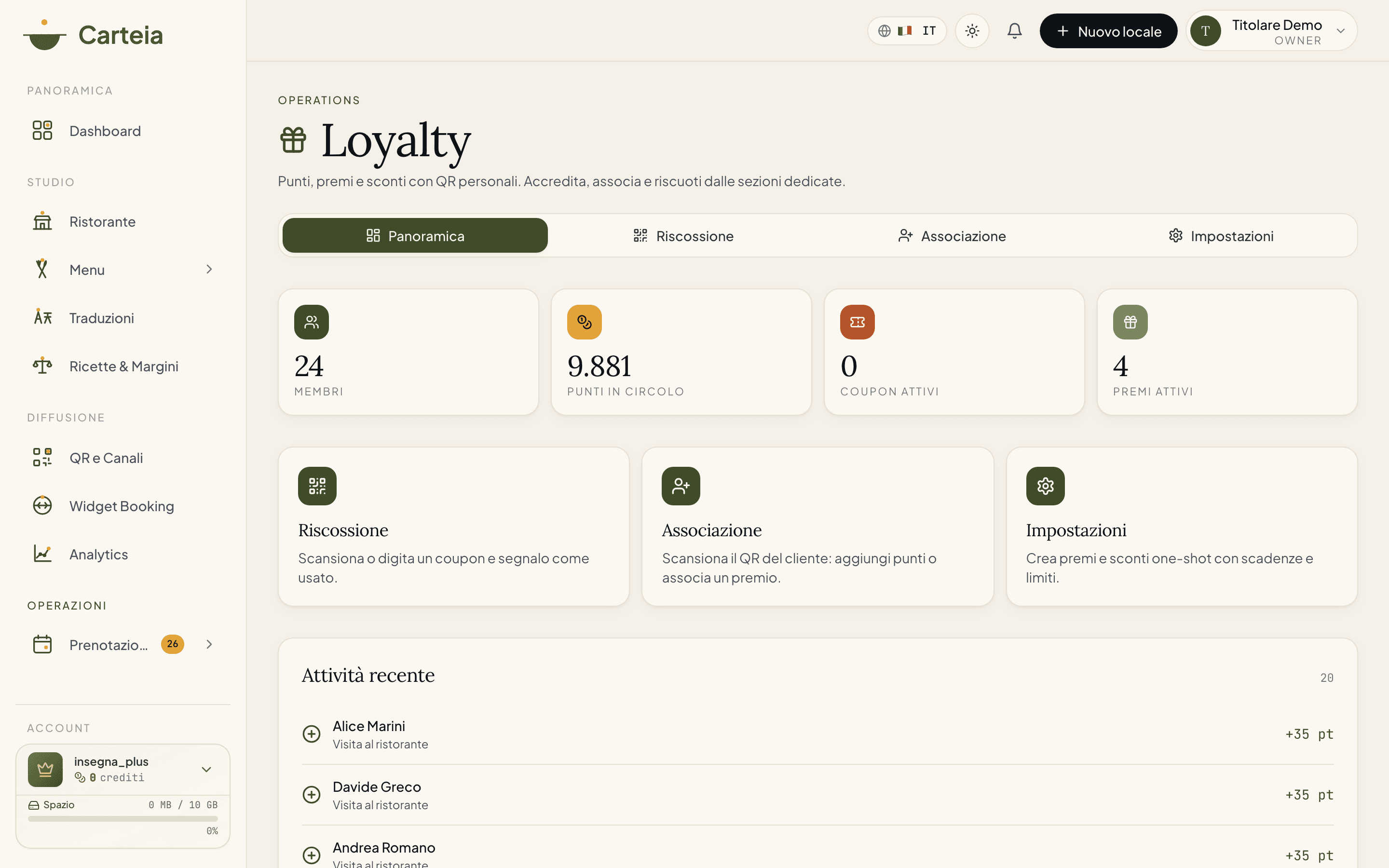
Loyalty has four sections, reachable from the tabs at the top:
- Overview — key numbers and recent activity.
- Redeem — where coupons get spent at the till.
- Assign — where you give points and rewards by scanning the customer's QR.
- Settings — where you create and manage rewards.
In the Overview you see four numbers: Members (how many customers take part), Points in circulation (total points still in customers' hands), Active coupons (rewards handed out and not yet used) and Active rewards (how many rewards you have in the catalogue). Below, the list of recent operations: who earned or spent points.
Create your rewards (Settings)
In Settings you click New reward and design it however you want. There are no fixed templates: every reward is yours. The fields you set:
- Name and description (e.g. "Free coffee", "House dessert").
- Type: Points reward (the customer pays in points) or Promotional discount (you can even make it free, at 0 points, for a flash promo).
- Points cost — how many points it takes to redeem it.
- Valid from / Expires on — the window when the reward is available (leave blank for "always on").
- Coupon duration — how many days the coupon lasts once handed out (e.g. 30 days to use it).
- Global cap — how many times in total it can be handed out (leave blank for unlimited).
- Max per customer + window in days — for example "max 1 per week per customer".
Each reward can be switched on/off with a click and edited anytime. If you delete a reward, coupons already handed out stay valid.
Give points and hand over rewards (Assign)
This is the section you use on the floor, in front of the customer.
Go to Assign and scan the customer's personal QR (from their Carteia account).
Carteia shows you who they are and how many points they have.
From here you choose: add points (after a visit or a purchase) or assign a reward from your catalogue.
If you assign a reward, a coupon with code and QR is created by itself: the customer gets it by email and in their Carteia area.
Points are added by hand this way (scanning the customer's QR or adjusting). No connected till required.
Redeem coupons (Redeem)
When the customer arrives at the till with their coupon (reward or discount):
Go to Redeem.
Scan the coupon's QR, or type the code the customer shows you.
Carteia tells you which reward it is and whether it's still valid.
You confirm and the coupon is marked used: it can't be reused.
A coupon can have four states: active (ready to use), used, expired or revoked. If you try to redeem an expired coupon or one from another venue, the system tells you and blocks it.
How much it costs
No credits. Creating rewards, adding points, handing over and redeeming coupons is all included in the plan. You pay the subscription, not the individual operations.
Numbers to watch
- Sign-ups to the program versus your total customers.
- Redemption rate: how many handed-out coupons actually get used.
- Frequency lift: how much more often enrolled customers come back compared with before.
- Points in circulation: how many "potential" rewards are out there (useful to estimate future cost).
Next steps
- Customer CRM — the address book it all starts from
- Marketing and campaigns — tell customers about new rewards
- Plans and credits — what the Insegna plan includes
Frequently Asked Questions
- Do I have to hand out a plastic card?
- No. The customer has a personal QR in their Carteia account. Staff scan it from the Assign section to give points or hand over a reward.
- How many rewards can I create?
- As many as you want. Each reward has a name, points cost, optional validity window, coupon duration and limits (total or per customer). They aren't fixed templates: you design them.
- How does the customer use a reward?
- When you assign a reward (or they request one from their area), they get a coupon with code and QR by email and in-app. At the till, staff scan it from the Redeem section and mark it used.
- Do rewards use credits?
- No. Creating rewards, adding points and redeeming coupons does not cost credits.
Version history
v3.0.02026-05-29— Full rewrite on the real product model: custom rewards and discounts with QR coupons, the Overview/Redeem/Assign/Settings sections, points added by scanning the customer QR. Removed the old 4 fixed tiers (bronze/silver/gold/platinum) and the 3 reward templates: they are no longer used in the product's loyalty flow.v2.0.02026-05-22— Previous version based on 4 fixed tiers and 3 reward templates (superseded).v1.0.02026-05-20— First publication.