



Multilingual menu translations
Carteia translates dishes, descriptions, categories and even ingredients, pairings and recipes into 8 languages. On Assaggio and Osteria AI translation only runs during onboarding; from Bistro up it's continuous and included. Digital menu languages: 2 on Assaggio/Osteria, 4 on Bistro, 8 from Ristorante up. A full translation costs 2 credits, but only once you use up the ones included in your month. Manual edits are never overwritten.
At a glance
The German tourist, the American, the French couple: they open the menu and read it in their language, the one on their phone, with no action from you in that moment. Carteia natively speaks 8 languages — Italian, English, French, German, Spanish, Portuguese, Russian, Chinese — and translates the menu with AI using real culinary vocabulary. You check it, fix where needed, and the public menu updates by itself.
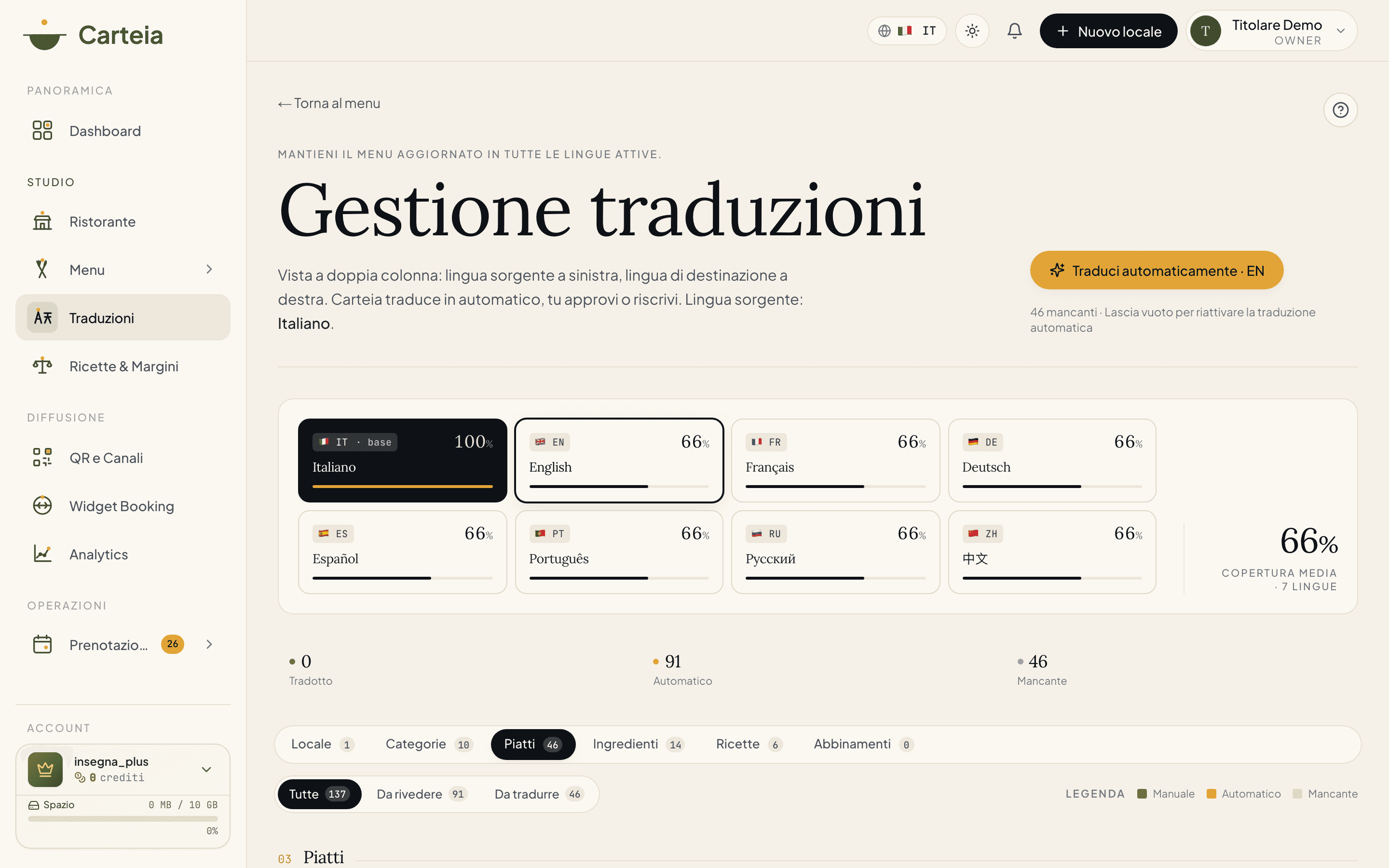
You'll find it under Dashboard → Translations.
How many languages you have
| Plan | Digital menu languages | PDF export languages |
|---|---|---|
| Assaggio Assaggio | 2 | 2 |
| Osteria Osteria | 2 | 2 |
| Bistro Bistro | 4 | 4 |
| Ristorante Ristorante | 8 | 8 |
| Insegna Insegna | 8 | 8 |
| Insegna Plus Insegna Plus | 8 | 8 |
Your source language (usually Italian) counts as one of these. So, for example, with Bistro you have Italian plus 3 other languages.
How AI translation works
Write the dishes in your source language (usually Italian).
Open Dashboard → Translations and pick the target language at the top.
Hit
Translate: the AI translates names, descriptions and categories with restaurant vocabulary, not with a generic translator.Review and fix by hand where needed (some traditional Italian dishes are best left in the original).
Save. The public menu is already updated.
It translates far more than just names
It doesn't stop at dishes and categories. When you launch a translation, the AI covers all the content of the restaurant:
- the venue name and description;
- the category names and descriptions;
- the title, description, ingredients and recommended pairing of every dish;
- the tasting notes of wines and beers and the beer ingredients;
- recipes and food-cost ingredients (name, preparation notes);
- the dish variants (sizes, cooking options, formats).
So the foreign guest finds everything translated, not half a menu.
The Translations page in detail
The page is organised by section — venue, categories, dishes, ingredients, recipes, pairings — so you find what you're after right away. At the top you pick the language you're working on. For each item you see the original alongside the translation, and you can:
- run automatic translation for one language or for all of them with the
Translatebutton; - fix any text by hand;
- use the filters to see only the items "to translate" (still missing) or "to review" (AI-translated), as well as "all".
Onboarding or continuous: what changes with your plan
- Assaggio Assaggio and Osteria Osteria
- AI translation runs once, during the initial menu creation. It's meant to get you started: translate the menu right after you build it. After that, edits don't re-trigger the AI by themselves — you adjust them by hand or move up to Bistro.
- Bistro Bistro and above
- Continuous, included translation: every time you change a text in the source language, the AI updates the other languages by itself, in the background. You stop thinking about it.
- Manual "translate all" run
- Costs Без дополнительной платы per run on a full menu — but only once you've used up the runs included in your plan. While you're within the quota, it's free.
Tips for translations that look the part
- Traditional Italian terms (e.g. cacio e pepe, amatriciana, focaccia) → keep them in Italian in the name, translate the description. They sound better that way, and tourists search for them by that exact name.
- Allergens → already translated automatically, don't touch them.
- DOP/IGP marks → not translated (e.g. Prosciutto di Parma DOP).
- Prices and symbols → stay identical in every language.
What the guest sees
The guest's phone signals its language and the menu opens in that language. If the language isn't among your plan's, the guest sees your source language (usually Italian). Either way, there's a language selector at the top right of the menu to switch by hand.
Next steps
- Multilingual PDF export — print the menu in every language
- AI menu import from PDF — translations start right after the import
- Publishing
- Plans and credits
Frequently Asked Questions
- How many languages can I have?
- It depends on the plan: 2 on Assaggio and Osteria, 4 on Bistro, 8 on Ristorante, Insegna and Insegna Plus. Italian (or your source language) counts as one of these.
- Can I fix the AI translations by hand?
- Yes, every item and every language is editable from the Translations page. And once you edit by hand, the AI no longer overwrites that line: your version stays.
- What's the difference between 'onboarding' and 'continuous' translation?
- On Assaggio and Osteria the AI translates only during the initial menu creation, once. From Bistro up translation is continuous: every time you change a text, the AI updates the other languages.
- What does the foreign guest see?
- The menu opens by itself in their phone's language. If that language isn't among your plan's, they see Italian. There's also a language selector at the top right of the menu.
- Do I have to translate allergens by hand?
- No, allergens are already translated automatically in every language. You don't think about it.
Version history
v2.0.02026-05-29— Rewrite aligned to the code. Added the 6 real plans and the correct languages per plan (2/2/4/8/8/8) and removed the Collezione plan. Fixed the translation cost (2 credits per run, not 4) and clarified it only applies beyond the included quota. Clarified the gate: onboarding-only on Assaggio AND Osteria, continuous from Bistro. Documented the real /dashboard/translations path with its 6 sections and filters, and every translated field (including ingredients, pairings, recipe notes, variants). Explained that manual edits are never overwritten.v1.0.02026-05-20— First publication.