



Event quotes
For every event request you put together a branded PDF quote starting from a block template: drag, write, drop in the customer's details automatically, check the preview and send by email or WhatsApp. Available from the Bistro plan. Each quote PDF costs 1 credit; sending it by WhatsApp costs 2 credits and starts from the Ristorante plan.
Why it pays off
When a customer asks you for an event quote, every hour that passes is an hour in which they could pick someone else. The difference between closing and losing is often speed and the care in the proposal.
With Carteia you put the quote together in a couple of minutes: start from a ready-written template, add your logo, write the price and send. No Word, no layout fiddling, no "I'll send it tonight" that becomes next week. A polished PDF that makes a difference, ready right away.
Which plan and how much it costs
- Quote PDF — Bistro
- Available from the Bistro plan, the same one that unlocks the events board.
- Cost of the PDF — Senza costo aggiuntivo
- Every time the quote PDF is generated, 1 credit is used — whether you write it yourself or use the AI assistant. Writing and saving the draft is free: you only pay when the PDF is created.
- Send by WhatsApp — Senza costo aggiuntivo Ristorante
- Sending by WhatsApp adds 2 credits and switches on from the Ristorante plan.
How it works: the blocks
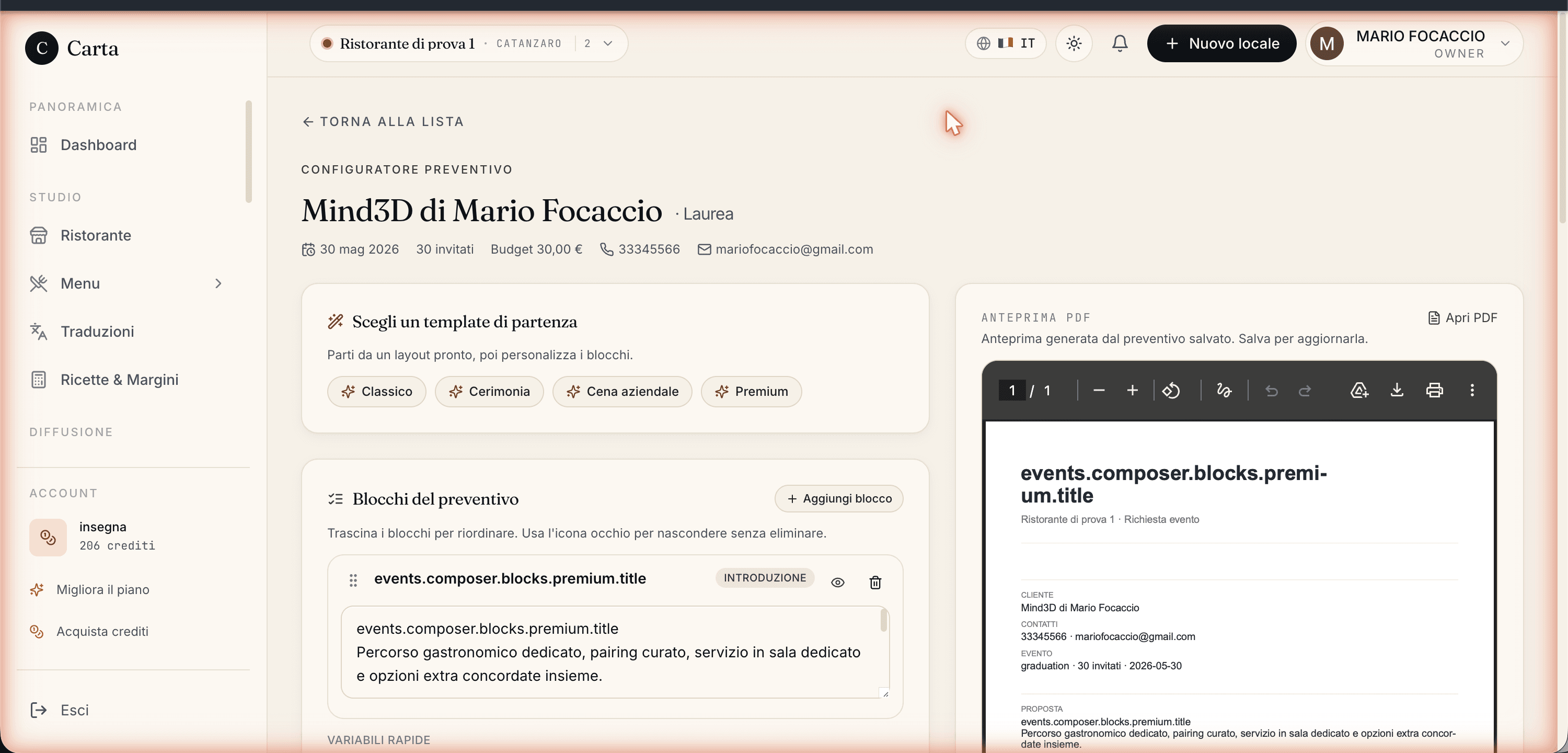
The quote is made of blocks, like building bricks. You reorder them by dragging, switch them on or off without deleting them, and add new ones. The ready-made blocks are:
- Introduction
- The greeting: thank them for the request, introduce the venue in two lines, confirm the date and guests.
- Highlights
- What makes your proposal special: tasting menu, wine pairing, private room, parking. A short list.
- Services
- The detail of what's included: number of courses, drinks, table service, set-up. This is the block that justifies the price.
- Terms
- How long the quote is valid, how to pay, the deposit required, the cancellation policy.
- Signature
- Your signature and contact details for questions. The closing.
You can always add a free block to write whatever you like.
The customer's details fill in by themselves
Inside the blocks you can drop in "placeholders" that fill in automatically with the request's details, so you don't have to retype them:
| Placeholder | What it becomes |
|---|---|
| Name | The name of the customer who made the request |
| Date | The date of the event |
| Guests | The number of expected guests |
| Budget | The budget the customer indicated |
| Venue | The name of your restaurant |
You drop them in with the coloured buttons below the editor: first click inside the block where you want them, then on the placeholder. They work both in the quote and in the email text.
The four quick templates
Above the editor there are four templates that fill the blocks with a starting point to suit the occasion: Classic, Ceremony, Corporate, Premium. Click one and the blocks populate; then change what you want.
Step by step
In Events open the request you want to quote for.
If you like, start from a quick template (Classic, Ceremony, Corporate, Premium).
Write the blocks: click on each one, write the content, drop in the customer's details with the placeholder buttons.
Reorder the blocks by dragging the handle on the left; switch off the ones you don't need.
Write the total in euros: Carteia formats it for you.
Check the PDF preview (on the right on a computer, in the Preview tab on a phone): it's the real PDF the customer will get.
Save the draft, then send by choosing email or WhatsApp.
The preview is the real PDF
The preview you see while you work is exactly the PDF the customer will get: your logo at the top, the blocks in the order you chose, the customer's details already filled in and the total at the bottom. On a phone the editor and preview are in two separate tabs (Composer and Preview) so you're not cramped.
Sending by email
Write a subject and message (here too you can use the placeholders with the customer's name), and the email goes out with the PDF attached. When you send it, the request moves to Quote sent on its own and the email stays logged in the card's diary. Emails go out through Carteia's professional mail system: for reaching the right inbox see the Marketing guide.
Sending by WhatsApp
Alternatively, Carteia prepares a WhatsApp message already written with the link to the PDF in it. You click and WhatsApp opens (the app on a phone, WhatsApp Web on a computer) with everything ready: you check and send.
What gets saved
So you don't lose your work and have everything tracked, each quote keeps: the title, the text (the visible blocks joined together), the total and the estimated value of the event (which can differ from the total, handy for your deal stats). Reopening the request, you find the quote where you left off.
Limits to know
- The quote is only made inside an existing event request: you need the request first.
- The details that fill in by themselves are five (name, date, guests, budget, venue). You can't add custom ones for now.
- The PDF link on WhatsApp expires after 14 days: beyond that, it has to be regenerated.
Next steps
- Private events — the full deal, from request to confirmation.
- Marketing and campaigns — delivery of emails and WhatsApp to customers.
- Plans and credits — how credits work.
Frequently Asked Questions
- How much does a quote cost?
- Generating the quote PDF costs 1 credit, whether you write it yourself or let the assistant help. Saving and editing the draft costs nothing: you only pay when the PDF is created. Sending by WhatsApp adds 2 credits (starts from the Ristorante plan).
- Is the quote a PDF I can print?
- Yes. It's a real PDF, with your logo at the top, ready to download, attach to an email or share by WhatsApp. You see it in a preview while you write it.
- Can I reuse the same quote for several customers?
- Yes. The blocks (services, terms, signature) are made to be reused. The details that change from customer to customer — name, date, guest count, total — you drop in with a click and they fill in by themselves when you send.
- How does the quote reach the customer?
- You have two routes: by email (with the PDF attached) or by WhatsApp (with a link to the PDF). Either way you can also write the covering message.
- Does the WhatsApp link expire?
- Yes: the link to the PDF sent by WhatsApp stays valid for 14 days. After that, if needed, you generate a new one by reopening the request.
Version history
v2.0.02026-05-29— Corrected the plan (from Ristorante to Bistro) and the credits (quote PDF 1 credit, manual or AI; WhatsApp 2 credits from Ristorante). Added: AI-assisted text variant, WhatsApp send detail. Rewritten in a plain tone.v1.1.02026-05-22— Added a real screenshot of the quote builder.v1.0.02026-05-22— First publication.