



Revenue per seat hour (RevPOSH): how much each seat in the dining room earns
Revenue per seat hour tells you how much you earn, on average, from each seat while it is occupied. Carteia calculates it on the real covers for the duration of the sitting (the 'per occupied seat' variant of the famous RevPASH), so it does not have to estimate opening hours. It appears in the Dining room section of the Statistics, from Ristorante onward; the value in euros requires the table revenue (QR table orders add-on).
In brief
Revenue per seat hour answers a simple question that is hard to answer by eye: how much does each seat in my venue earn, on average, while it is occupied? A table for four that turns over twice in an evening earns more than a table for six occupied just once by a couple: revenue per seat hour puts everyone on the same scale, so you compare rooms, shifts, and evenings on equal terms of seats and time.
In Carteia you find it in the Dining room section of the Statistics page, in the Resa posto-ora column. It is available from Ristorante onward.

Why it is the most important number in the dining room
Almost all restaurateurs look at the evening's revenue. But revenue alone is misleading: an evening with the room full for four hours can earn, seat by seat, less than an evening with the room half full but tables that turn over quickly. Revenue per seat hour removes the deception because it takes two things into account together:
- how many seats you have occupied (not just how many tables);
- for how long you have kept them occupied.
It is the same reasoning hotels have used for decades with revenue per available room. In the restaurant business, the "inventory" you sell is the seat per unit of time: every empty seat, or one occupied too long by someone who consumes little, is margin that does not come back.
How to read the table
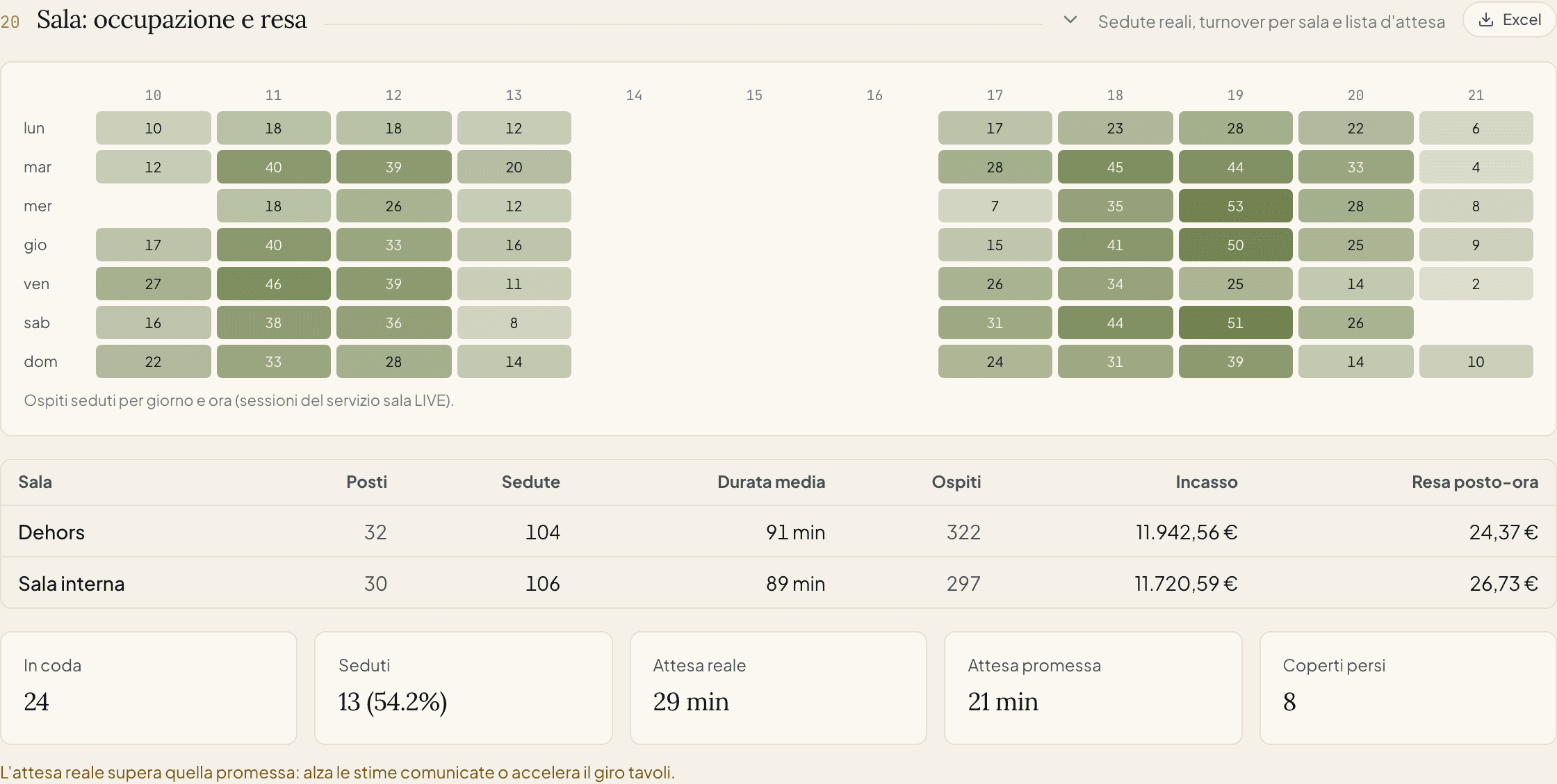
For each room you see, in the selected period:
- Seats
- The active seats in the room.
- Sittings
- How many times a table was occupied and freed (the dining room service sessions).
- Average duration
- How long a table stays seated on average, in minutes.
- Guests
- The total covers served in the room.
- Revenue
- The revenue of the orders linked to those sittings.
- Revenue per seat hour
- The heart of the table: revenue divided by the seat-hours actually occupied. It is how much, on average, each seat earned you for each hour it was occupied.
How Carteia calculates it (and why it is honest)
Here lies the important part, and it is worth explaining in plain words, because it distinguishes Carteia's revenue figure from the one you find in many articles.
Carteia's formula is:
Revenue per seat hour = Revenue ÷ (sum, for each sitting, of: covers × duration of the sitting in hours)
In other words: the denominator is not the theoretically available seats multiplied by opening hours, but the seats actually occupied for the real time they were occupied. A sitting of 4 people lasting an hour and a half "weighs" 6 seat-hours; one of 2 people lasting an hour "weighs" 2 seat-hours. You sum everything and divide the revenue by that total.
Why this choice? Because it is honest and requires no estimates:
- you do not have to declare how many hours a day the room is "open" (a number that changes between lunch, dinner, seasons, closing days);
- the result comes only from real sittings, recorded by the LIVE table service;
- no phantom seats: if a table stayed empty, it simply does not enter the count.
Revenue per seat hour and RevPASH: the same idea, two denominators
If you search online you will often find the term RevPASH (Revenue Per Available Seat Hour), considered the leading KPI of the restaurant business. Its classic formula is:
RevPASH = Revenue ÷ (AVAILABLE seats × hours)
For example, according to a sector explanation from TheFork Manager: a venue with 25 seats that earns €400 from 8:00 PM to 9:00 PM has a RevPASH of 400 ÷ 25 = €16 per seat hour; a venue with 40 seats that earns €6,500 in 5 hours has 6,500 ÷ (40 × 5) = €32.50 per seat hour.
The difference with Carteia is just one, but it matters:
| "Classic" RevPASH | Carteia's revenue per seat hour | |
|---|---|---|
| What is in the denominator | Available seats × opening hours | Occupied seats × real duration of the sittings |
| What it measures | Revenue and fill rate together (an empty seat lowers the number) | How much a seat earns while it is occupied |
| What is needed to calculate it | Knowing/estimating how many seats and how many hours you "sell" | Only the real sittings, already recorded |
| Does it penalize empty seats? | Yes | No (it measures them separately, with occupancy) |
They are complementary, not in competition:
- revenue per seat hour tells you how much those who sit down spend (ticket quality and table turnover speed);
- occupancy (the day × hour heatmap, next to the table) tells you how much you use the capacity (how many seats you fill and when).
Read together, they give the complete picture: a room can have excellent revenue but low occupancy (few tables, well spent) or high occupancy but low revenue (a room full of people who consume little).
What you can do with it, in practice
- Compare rooms. If the dehors earns less than the indoor room for the same number of seats, perhaps the tables are too far from the service, or the menu outside is not the same.
- Choose the layout. Many large tables occupied by couples lower the revenue: sometimes two tables for two earn more than one for four.
- Work on table turnover. If the average duration is very high and the revenue low, the problem is not the price but the time: faster desserts and checks free up seats for a second sitting.
- Push the ticket at the right hours. By cross-referencing revenue and occupancy you discover the time slots where you have occupied seats but low revenue: there, a pairing or a server's suggestion makes the difference.
What is needed for it to appear
Revenue per seat hour comes from two ingredients, and it must be said clearly:
- The real sittings. They are produced by the LIVE table service (Table Manager), included from Ristorante onward. Without recorded sittings there is nothing to calculate.
- The table revenue. The revenue figure is in euros, so it needs the checks linked to the sittings. These come from table orders: the column is valued if the QR table orders add-on is active for the venue.
Limits per plan
| Feature | Assaggio | Osteria | Bistro | Ristorante | Insegna | Insegna Plus |
|---|---|---|---|---|---|---|
| Room occupancy and sittings | No | No | No | Yes | Yes | Yes |
| Average duration and covers per room | No | No | No | Yes | Yes | Yes |
| Revenue per seat hour (value in euros) | No | No | No | Add-on | Add-on | Add-on |
What it is NOT
- It is not the margin. Revenue per seat hour looks at revenue, not net profit: two dishes that sell the same may have different food costs. For the margin see Food cost and the dish matrix.
- It is not an absolute grade. There is no universally "right" revenue figure: it depends on the type of venue, the city, the average ticket. The value is in the comparison — between your rooms, your shifts, your months.
- It does not replace occupancy. On its own it does not tell you whether the room is full or empty: it must be read together with the occupancy heatmap.
Related features
- Insights and statistics — the page that contains the Dining room section.
- Table management — the LIVE service that generates the real sittings.
- QR table orders — brings the table revenue into the revenue calculation.
- Food cost — to move from revenue to margin.
Frequently Asked Questions
- Revenue per seat hour, RevPASH, RevPOSH: are they the same thing?
- They are close relatives. 'RevPASH' is the classic restaurant term (revenue per available seat, per hour). Carteia calculates the variant on the seats actually occupied — sometimes called RevPOSH — and in the dashboard shows it as 'Resa posto-ora'. It measures the same idea: how much a seat earns over time.
- Why does Carteia use occupied seats and not available ones?
- Because it is honest and requires no estimates: it uses the real covers and the real duration of each sitting, without having to ask you how many hours a day the dining room is 'theoretically' open. The number you see comes only from real sittings.
- Why does the 'Resa posto-ora' column show a dash?
- Because the revenue linked to the sittings is missing. Revenue in euros needs the table orders: it appears valued if the QR table orders add-on is active for the venue. Without it, you still see sittings, duration, and covers.
- From which plan is it available?
- From Ristorante onward. It requires the Table Manager (the dining room management), which produces the real sittings the calculation is based on.
Version history
v1.0.02026-06-12— Prima pubblicazione: definizione, calcolo Carteia (posti occupati), confronto con il RevPASH classico, lettura e usi pratici.