



Customer CRM
The customer address book starts on the Bistro plan: every reservation, event or order creates the customer record by itself, with history, estimated value and no-shows. From the Insegna plan you unlock dynamic segments, the editable record (tags, allergens, preferences, notes) and export. Importing an existing list is from Ristorante and costs 1 credit per 100 contacts.
Why you need it
Picture the customer who comes every Friday night, always orders the same bottle, and once told you they're coeliac. You know that, but if someone else is on the floor that night, the knowledge is lost.
The CRM is your venue's memory that never forgets: an address book that fills itself in with every reservation, event or order, and tells you who comes back, how much they're worth, what they prefer and who you're allowed to write to. You'll find it under Customers in the left menu.
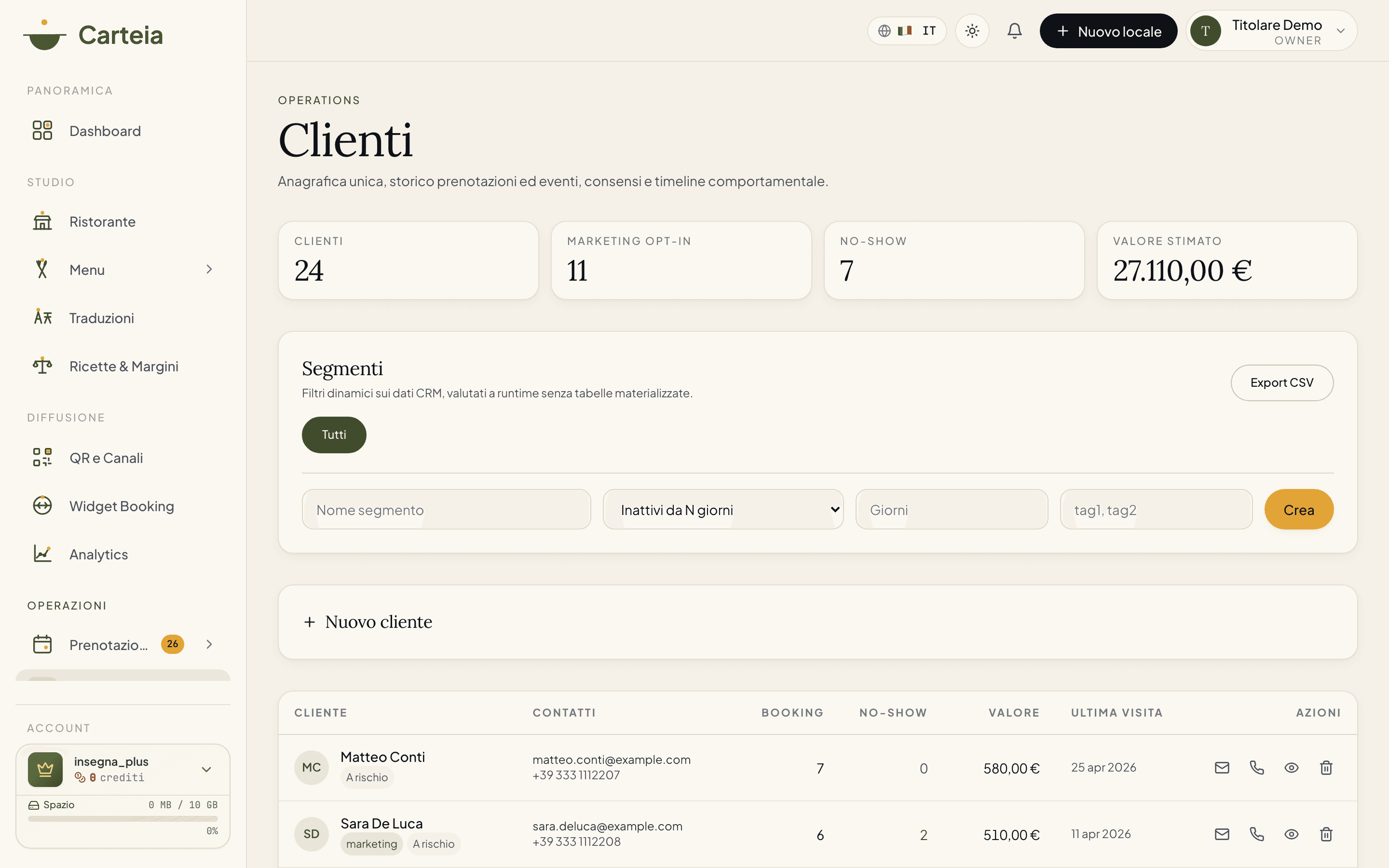
The numbers you see right away
As soon as you open it, four numbers at the top give you a read on your customer base:
- Customers — how many contacts you have (filtered by the active segment).
- Marketing opt-in — how many gave you consent to receive communications. You can only write to these.
- No-shows — how many times someone booked and didn't show up.
- Estimated value — how much the customers you're looking at are worth, in euros.
The address book fills itself in
You don't type a thing. Every time a reservation, event request or menu order with an account comes in, Carteia creates (or updates) the customer record. Number of bookings, no-shows and last visit date update by themselves.
In the list, next to each name, you see at a glance the marketing label if they gave consent, plus their tags. From there you call them, write to them, or open their full record.
What you get from the start — Bistro
From the Bistro plan you have the full address book in read mode:
- Customer details (name, email, phone).
- History of reservations, private events and a timeline of everything they've done.
- Number of visits, no-shows and estimated value, always current.
- Search and filters to find anyone in a second.
What you unlock from the Insegna plan — Insegna
From the Insegna plan the CRM becomes active: you don't just look, you work on customers.
Add and edit records
You can create a customer by hand and, above all, enrich each record with:
- Free tags (e.g.
vip,vegetarian,regular). - Allergens (e.g. gluten, lactose) — handy when they book.
- Dietary preferences (e.g. vegan, pescatarian).
- Internal notes visible only to your team (e.g. "prefers the table by the window").
Build your segments
A segment is a group of customers that updates by itself. You set the rule, Carteia puts in whoever matches, always current. The available rules:
| Segment | Who lands in it |
|---|---|
| New within N days | Customers registered in the last N days |
| Returning | Anyone with at least a certain number of bookings |
| Inactive for N days | Anyone who hasn't been in for more than N days |
| No-show | Anyone who didn't show up at least once |
| Marketing consent | Anyone who gave you consent to receive communications |
| Tag contains | Anyone with a given tag (e.g. all the vip) |
A concrete example: create the "Inactive for 90 days" segment, then from the Marketing section send that group an offer to bring them back. Or filter the vip before a special event and invite them first.
Download the address book
With one click you export all customers to a spreadsheet file with email, phone, number of bookings, no-shows, last visit, estimated value and consent status. Handy for backups or your accountant.
Bring in a list you already have — Ristorante Costo variabile
Already have a contact list in a file? From the Ristorante plan you load it into Carteia. The import costs 1 credit per 100 contacts imported.
Prepare a file with an
emailcolumn (required) and, if you like,phone,first_name,last_name,tags.Upload it: Carteia cleans the emails, merges duplicates and tells you how many rows it found.
Confirm and the contacts land in the address book. Rows without a valid email are skipped (it tells you).
Practical limits: up to 50,000 rows and 5 MB per file. More contacts than that? Split the file into several uploads.
Consent and privacy, in plain words
By law (GDPR), to send promotional communications you need the customer's explicit consent. Carteia helps you stay compliant without thinking about it:
- When you create a customer by hand, there's a checkbox to declare you already collected consent (verbally or on paper). It's tracked with date and policy version.
- If a customer has revoked consent in the past, the system won't let you re-enable it by hand. To re-subscribe them, they have to confirm by clicking a link in an email: it's called double opt-in. You'll find the Send double opt-in button on their record.
- When you try to send a campaign, Carteia excludes anyone without consent by itself. You won't risk writing to someone who doesn't want it.
In short: you do your job, the system keeps the register and stops you before you make a mistake that costs dearly.
Next steps
- Marketing and campaigns — use segments to reach the right customers
- Loyalty — reward those who come back
- Reservations — where customer records are born
Frequently Asked Questions
- Do I have to enter customers by hand?
- No. Every reservation, event request or menu order creates the customer record by itself, keeping email, phone, visit count and last visit always up to date.
- Can I download my address book?
- Yes, as a spreadsheet file from the Insegna plan. You can only contact customers who gave marketing consent: Carteia blocks sending to the others by itself.
- What are segments?
- Live filters: 'new customers', 'returning', 'inactive for X days', 'no-shows', 'with marketing consent', 'with a given tag'. Carteia recalculates them on the fly — you update nothing.
- A customer asked to stop receiving emails. What do I do?
- If they already revoked consent, the system won't let you re-enable it by hand: they must confirm from an email themselves (double opt-in). It's the GDPR rule and it protects you from fines.
Version history
v3.0.02026-05-29— Full rewrite with the informal tone. Fixed the entry plan for the base CRM (Bistro, not Ristorante). Fixed the real segments (new/returning/inactive/no-show/consent/tag) instead of the invented RFM ones. Documented the real record fields (tags, allergens, preferences, notes), the GDPR consent flow with double opt-in and the contact file import.v1.0.02026-05-20— First publication (entry plan and RFM segments did not match the code).